AWS VPC and EC2 Instance
In this example, we'll demonstrate how to set up a complete VPC networking stack with an EC2 web server instance in AWS using stackql-deploy and the awscc (Cloud Control) provider. Resources are identified using the awscc.tagging.tagged_resources service with a standard tag taxonomy.
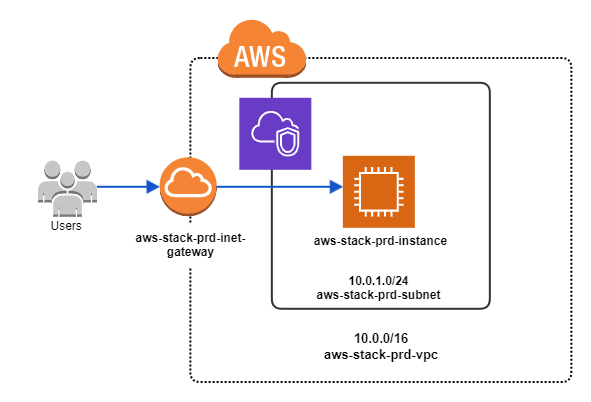
The EC2 instance is bootstrapped with a web server that serves a simple page using the EC2 instance UserData property.
Deploying the Stack
Install
stackql-deploy(see Installing stackql-deploy), set theAWS_ACCESS_KEY_ID,AWS_SECRET_ACCESS_KEYandAWS_REGIONenvironment variables, that's it!
Once you have setup your project directory (your "stack"), you can use the stackql-deploy cli application to deploy, test or teardown the stack in any given environment. To deploy the stack to an environment labeled dev, run the following:
stackql-deploy build examples/aws/aws-vpc-webserver dev
Use the --dry-run flag to view the queries to be run without actually running them:
stackql-deploy build examples/aws/aws-vpc-webserver dev --dry-run --show-queries
stackql_manifest.yml
The stackql_manifest.yml defines the resources in your stack and their property values (for one or more environments). This stack uses the awscc provider with a standard tag taxonomy (stackql:stack-name, stackql:stack-env, stackql:resource-name) for resource identification.
Click to expand the stackql_manifest.yml file
version: 1
name: "aws-vpc-webserver"
description: Provisions a complete AWS networking stack (VPC, subnet, internet gateway, route table, security group) with an Apache web server EC2 instance.
providers:
  - awscc
globals:
  - name: region
    description: aws region
    value: "{{ AWS_REGION }}"
  - name: global_tags
    value:
      - Key: 'stackql:stack-name'
        Value: "{{ stack_name }}"
      - Key: 'stackql:stack-env'
        Value: "{{ stack_env }}"
      - Key: 'stackql:resource-name'
        Value: "{{ resource_name }}"
resources:
  - name: example_vpc
    props:
      - name: vpc_cidr_block
        values:
          prd:
            value: "10.0.0.0/16"
          sit:
            value: "10.1.0.0/16"
          dev:
            value: "10.2.0.0/16"
      - name: vpc_tags
        value:
          - Key: Name
            Value: "{{ stack_name }}-{{ stack_env }}-vpc"
        merge:
          - global_tags
    exports:
      - vpc_id
      - vpc_cidr_block
  - name: example_subnet
    props:
      - name: subnet_cidr_block
        values:
          prd:
            value: "10.0.1.0/24"
          sit:
            value: "10.1.1.0/24"
          dev:
            value: "10.2.1.0/24"
      - name: subnet_tags
        value:
          - Key: Name
            Value: "{{ stack_name }}-{{ stack_env }}-subnet"
        merge: ['global_tags']
    exports:
      - subnet_id
      - availability_zone
  - name: example_inet_gateway
    props:
      - name: inet_gateway_tags
        value:
          - Key: Name
            Value: "{{ stack_name }}-{{ stack_env }}-inet-gateway"
        merge: ['global_tags']
    exports:
      - internet_gateway_id
  - name: example_inet_gw_attachment
    props: []
  - name: example_route_table
    props:
      - name: route_table_tags
        value:
          - Key: Name
            Value: "{{ stack_name }}-{{ stack_env }}-route-table"
        merge: ['global_tags']
    exports:
      - route_table_id
  - name: example_subnet_rt_assn
    props: []
    exports:
      - subnet_route_table_assn_id
  - name: example_inet_route
    props: []
  - name: example_security_group
    props:
      - name: group_description
        value: "web security group for {{ stack_name }} ({{ stack_env }} environment)"
      - name: group_name
        value: "{{ stack_name }}-{{ stack_env }}-web-sg"
      - name: sg_tags
        value:
          - Key: Name
            Value: "{{ stack_name }}-{{ stack_env }}-web-sg"
        merge: ['global_tags']
      - name: security_group_ingress
        value:
          - IpProtocol: "tcp"
            CidrIp: "0.0.0.0/0"
            Description: Allow HTTP traffic
            FromPort: 80
            ToPort: 80
          - IpProtocol: "tcp"
            CidrIp: "{{ vpc_cidr_block }}"
            Description: Allow SSH traffic from the internal network
            FromPort: 22
            ToPort: 22
      - name: security_group_egress
        value:
        - CidrIp: "0.0.0.0/0"
          Description: "Allow all outbound traffic"
          FromPort: -1
          ToPort: -1
          IpProtocol: "-1"
    exports:
      - security_group_id
  - name: example_web_server
    props:
      - name: ami_id
        value: ami-05024c2628f651b80
      - name: instance_type
        value: t2.micro
      - name: instance_subnet_id
        value: "{{ subnet_id }}"
      - name: sg_ids
        value:
          - "{{ security_group_id }}"
      - name: user_data
        value: |
          #!/bin/bash
          yum update -y
          yum install -y httpd
          systemctl start httpd
          systemctl enable httpd
          echo '<!DOCTYPE html>...' > /var/www/html/index.html
      - name: instance_tags
        value:
          - Key: Name
            Value: "{{ stack_name }}-{{ stack_env }}-instance"
        merge: ['global_tags']
    exports:
      - instance_id
  - name: get_web_server_url
    type: query
    props: []
    exports:
      - public_dns_name
Resource Query Files
Resource query files are templates which are used to create, update, test and delete resources in your stack. This stack uses the identifier capture pattern — the exists query discovers the resource via tags and the captured field is used in statecheck and exports queries via {{ this.<field> }}.
- example_vpc.iql
- example_subnet.iql
/*+ exists */
WITH tagged_resources AS
(
    SELECT split_part(ResourceARN, '/', 2) as vpc_id
    FROM awscc.tagging.tagged_resources
    WHERE region = '{{ region }}'
    AND TagFilters = '{{ global_tags | to_aws_tag_filters }}'
    AND ResourceTypeFilters = '["ec2:vpc"]'
),
vpcs AS
(
    SELECT vpc_id
    FROM awscc.ec2.vpcs_list_only
    WHERE region = '{{ region }}'
)
SELECT r.vpc_id
FROM vpcs r
INNER JOIN tagged_resources tr
ON r.vpc_id = tr.vpc_id;

/*+ statecheck, retries=5, retry_delay=5 */
SELECT COUNT(*) as count FROM
(
SELECT
AWS_POLICY_EQUAL(tags, '{{ vpc_tags }}') as test_tags
FROM awscc.ec2.vpcs
WHERE Identifier = '{{ this.vpc_id }}'
AND region = '{{ region }}'
AND cidr_block = '{{ vpc_cidr_block }}'
) t
WHERE test_tags = 1;

/*+ create */
INSERT INTO awscc.ec2.vpcs (
 CidrBlock, Tags, EnableDnsSupport, EnableDnsHostnames, region
)
SELECT
 '{{ vpc_cidr_block }}', '{{ vpc_tags }}', true, true, '{{ region }}'
RETURNING *;

/*+ exports */
SELECT '{{ this.vpc_id }}' as vpc_id,
'{{ vpc_cidr_block }}' as vpc_cidr_block;

/*+ delete */
DELETE FROM awscc.ec2.vpcs
WHERE Identifier = '{{ vpc_id }}'
AND region = '{{ region }}';
/*+ exists */
WITH tagged_resources AS
(
    SELECT split_part(ResourceARN, '/', 2) as subnet_id
    FROM awscc.tagging.tagged_resources
    WHERE region = '{{ region }}'
    AND TagFilters = '{{ global_tags | to_aws_tag_filters }}'
    AND ResourceTypeFilters = '["ec2:subnet"]'
),
subnets AS
(
    SELECT subnet_id
    FROM awscc.ec2.subnets_list_only
    WHERE region = '{{ region }}'
)
SELECT r.subnet_id
FROM subnets r
INNER JOIN tagged_resources tr
ON r.subnet_id = tr.subnet_id;

/*+ statecheck, retries=5, retry_delay=5 */
SELECT COUNT(*) as count FROM
(
SELECT
AWS_POLICY_EQUAL(tags, '{{ subnet_tags }}') as test_tags
FROM awscc.ec2.subnets
WHERE Identifier = '{{ this.subnet_id }}'
AND region = '{{ region }}'
AND cidr_block = '{{ subnet_cidr_block }}'
AND vpc_id = '{{ vpc_id }}'
) t
WHERE test_tags = 1;

/*+ create */
INSERT INTO awscc.ec2.subnets (
 VpcId, CidrBlock, MapPublicIpOnLaunch, Tags, region
)
SELECT
 '{{ vpc_id }}', '{{ subnet_cidr_block }}', true,
 '{{ subnet_tags }}', '{{ region }}'
RETURNING *;

/*+ exports, retries=5, retry_delay=5 */
SELECT subnet_id, availability_zone
FROM awscc.ec2.subnets
WHERE Identifier = '{{ this.subnet_id }}'
AND region = '{{ region }}';

/*+ delete */
DELETE FROM awscc.ec2.subnets
WHERE Identifier = '{{ subnet_id }}'
AND region = '{{ region }}';
Key Patterns
Tag-Based Resource Discovery
Resources are identified using awscc.tagging.tagged_resources cross-referenced with the provider's *_list_only resource via a CTE + INNER JOIN. This ensures the resource both has the expected tags and currently exists in the provider (eliminating stale tag records).
to_aws_tag_filters Filter
The global_tags variable is converted to AWS TagFilters format using the to_aws_tag_filters custom filter, keeping queries clean:
AND TagFilters = '{{ global_tags | to_aws_tag_filters }}'
Property Verification with AWS_POLICY_EQUAL
Statechecks use AWS_POLICY_EQUAL for order-independent comparison of tags and security group rules.
More Information
The complete code for this example stack is available here. For more information on how to use StackQL and StackQL Deploy, visit: